Voice-powered documents for contractors

Voice-powered documents for contractors

Capture Work in the Field.
Get Paid Faster.

Capture Work in the Field.
Get Paid Faster.

Capture Work in the Field.
Get Paid Faster.

Capture Work in the Field.
Get Paid Faster.

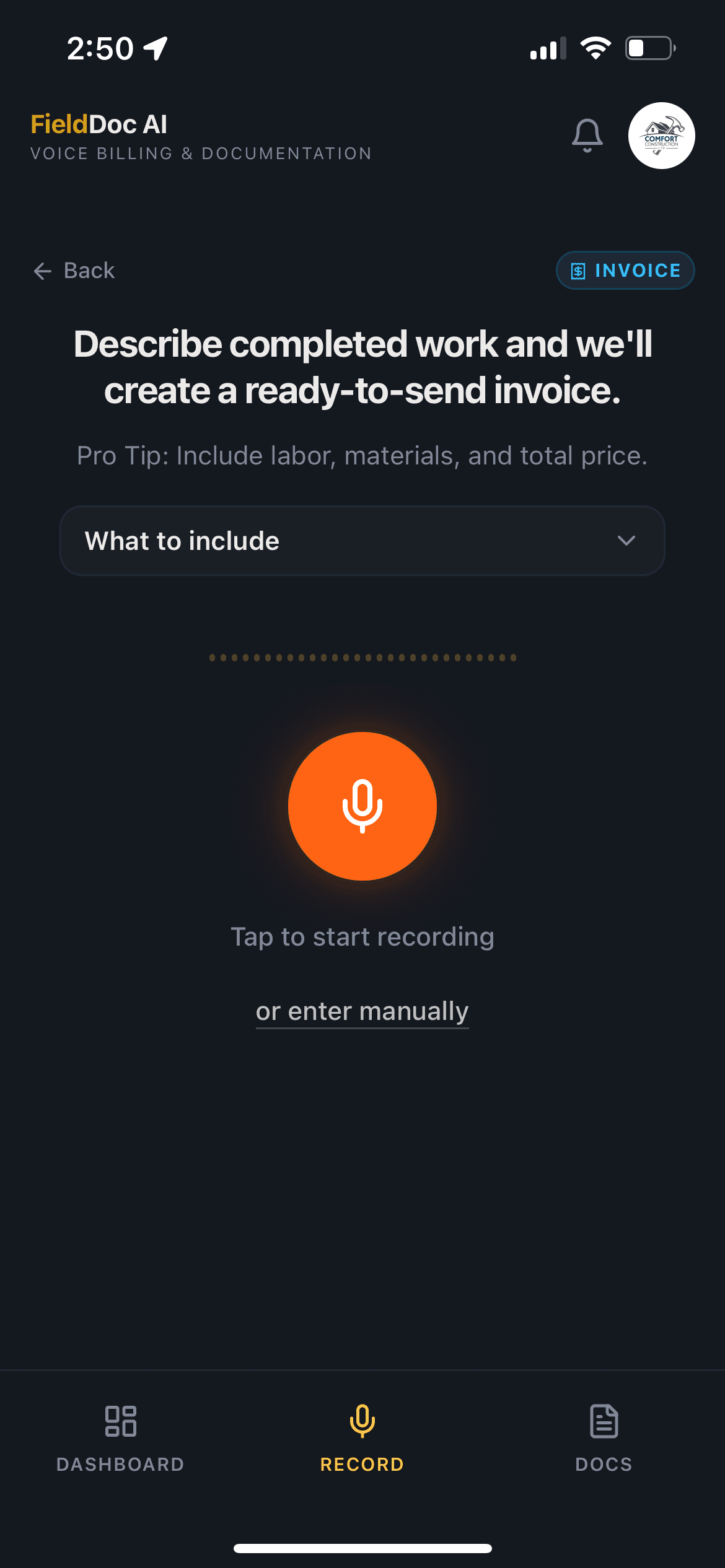
Record jobsite details by voice, generate a professional document, and send it for approval, signature, or payment in minutes.

Record jobsite details by voice, generate a professional document, and send it for approval, signature, or payment in minutes.

Record jobsite details by voice, generate a professional document, and send it for approval, signature, or payment in minutes.

14-day free trial. No credit card required.

Plans start at $14.99/month after trial.

14-day free trial. No credit card required.

Plans start at $14.99/month after trial.

Join contractors who trust FieldDoc AI

Join contractors who
trust FieldDoc AI

Join contractors who
trust FieldDoc AI

0

minutes

0

minutes

From voice note to professional document

0

hours +

0

hours +

Saved on paperwork every week

$

0

k+

$

0

k+

Yearly revenue protected using FieldDoc AI

Less paperwork. Faster approvals.
Cleaner records.

Less paperwork.
Faster approvals.
Cleaner records.

Less paperwork.
Faster approvals.
Cleaner records.

Less paperwork.
Faster approvals. Cleaner records.

FieldDoc AI helps contractors capture jobsite details as they happen, turn them into professional documents, and send them to clients before leaving the jobsite.

FieldDoc AI helps contractors capture jobsite details as they happen, turn them into professional documents, and send them to clients before leaving the jobsite.

Voice-First Documentation

Record jobsite details while you’re still in the field instead of typing long notes after hours.

Faster Client Approvals

Turn field notes into clear change orders, invoices, T&M tickets, and daily logs your clients can review quickly.

Professional PDFs

Send polished documents that look organized, accurate, and ready for approval, signature, or payment.

Fewer Missed Details

Capture labor, materials, costs, notes, and jobsite updates before important details get forgotten.

Background Image

Turn Field Notes Into Finished Documents

Turn Field Notes Into
Finished Documents

Turn Field Notes Into
Finished Documents

Turn Field Notes Into Finished Documents

Talk Through the Work

Record jobsite notes by voice before the details get forgotten.

Finished Documents

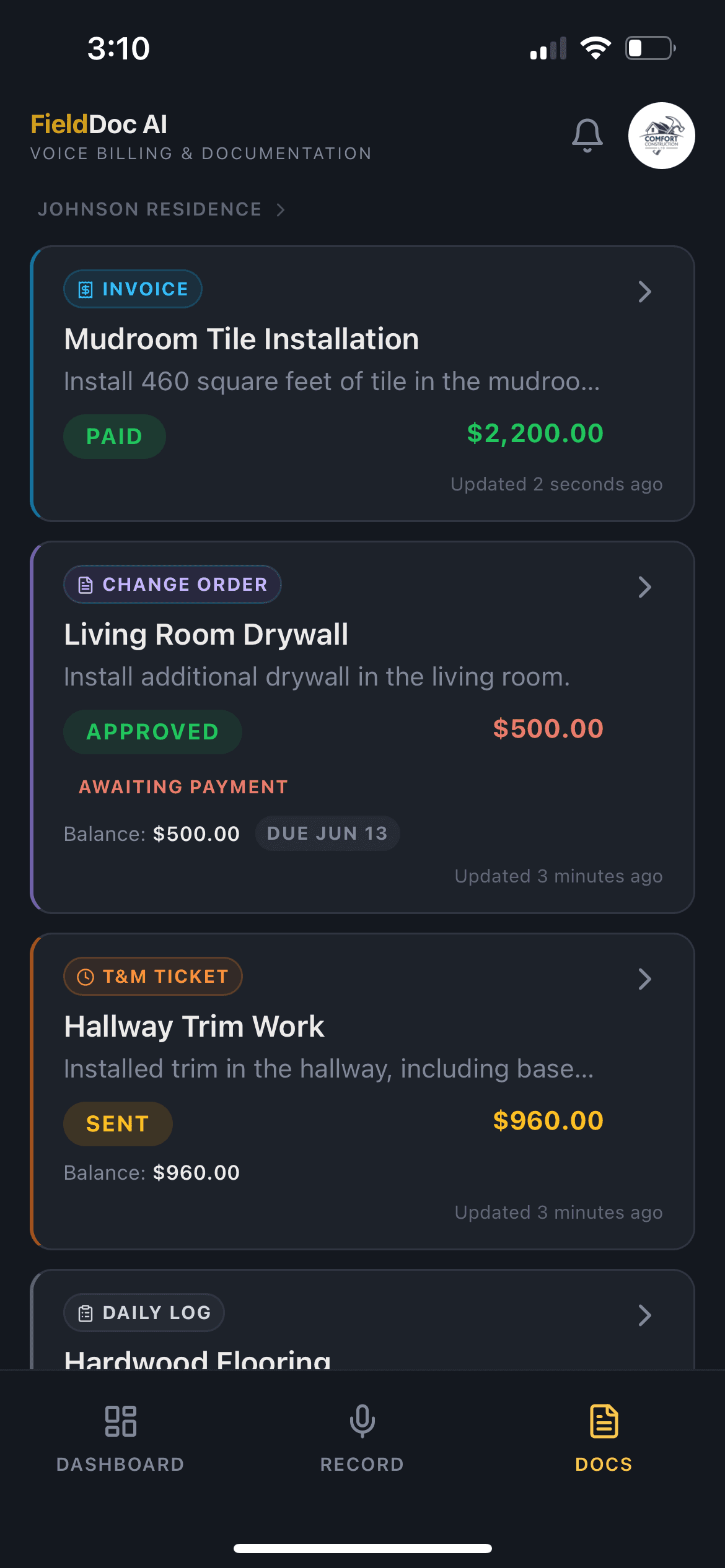
Turn field notes into change orders, invoices, T&M tickets, and daily logs.

Client Approvals

Send documents for review, approval, and signature without chasing paperwork.

Online Payments

Send clients a payment request so they can pay online.

Online Payments

Send clients a payment request so they can pay online.

From Voice Note to Client-Ready PDF

From Voice Note to Client-Ready PDF

From Voice Note to Client-Ready PDF

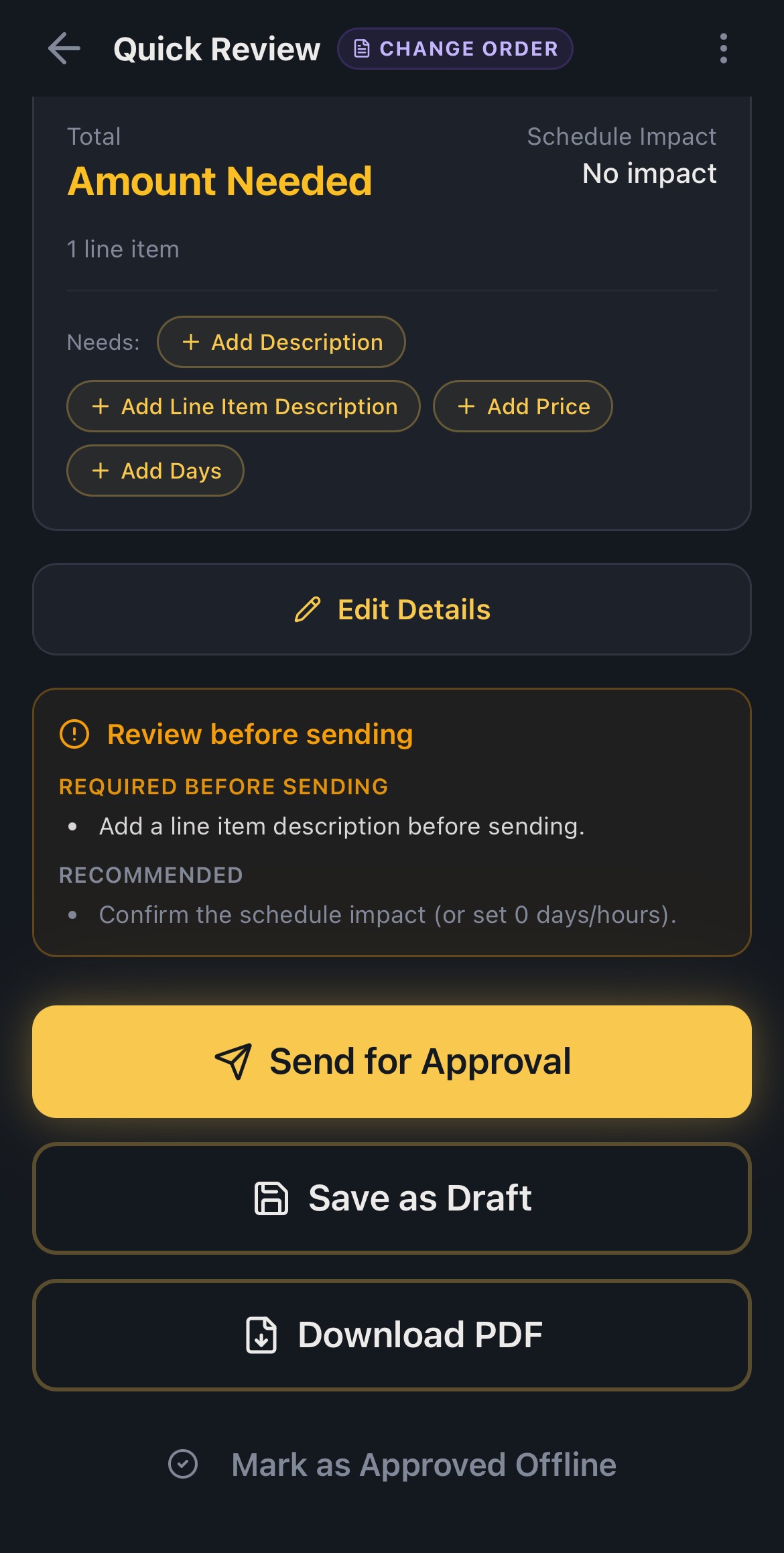
Choose a document type, record the jobsite details, review the AI-generated draft, and send a professional PDF for approval, signature, or payment.

Choose a document type, record the jobsite details, review the AI-generated draft, and send a professional PDF for approval, signature, or payment.

Choose a document type, record the jobsite details, review the AI-generated draft, and send a professional PDF for approval, signature, or payment.

View Sample PDF

Select Document Type

Record Jobsite Details

Review AI Draft

Send for Approval

Request Payment

14-day free trial. No credit card required.

Plans start at $14.99/month after trial.

14-day free trial. No credit card required.

Plans start at $14.99/month after trial.

Everything You Need to
Document Work Faster

Everything You Need to
Document Work Faster

Everything You Need to
Document Work Faster

Create, review, send, approve, and collect payment from jobsite documents without jumping between notes, emails, PDFs, and payment apps.

Create, review, send, approve, and collect payment from jobsite documents without jumping between notes, emails, PDFs, and payment apps.

Card Image

AI Voice Capture

Record jobsite details without typing long notes.
Card Image

Smart Document Drafts

Generate change orders, invoices, T&M tickets, and daily logs.

Card Image

Professional PDFs

Send polished documents your clients can actually understand.

Card Image

Approvals & Signatures

Get approval and signatures without chasing paperwork.

Card Image

Stripe & Square Payments

Send payment requests directly from your documents.

Card Image

Status Tracking

Track drafts, sent documents, approvals, payments, and overdue items.

Simple Pricing
for Contractors

Everything you need to create, send, track, approve, and collect payment from jobsite documents — without paying for a full project management platform.

Everything you need to create, send, track, approve, and collect payment from jobsite documents — without paying for a full project management platform.

Monthly Plan

$14.99

/per month

14-day free trial included

Everything you need to document work faster.

14-day free trial. No credit card required.

What’s Included

AI voice document creation

Record in up to 10 supported languages

Change orders, invoices, T&M tickets & daily logs

Professional client-ready PDFs

Client approvals, signatures & change requests

Stripe & Square payment requests

Dashboard tracking, reminders & recent activity

Custom document template settings

Mobile, tablet & desktop access

Annual Plan

$149.99

/per year

2 months free

Same features, plus big savings.

What’s Included

AI voice document creation

Record in up to 10 supported languages

Change orders, invoices, T&M tickets & daily logs

Professional client-ready PDFs

Client approvals, signatures & change requests

Stripe & Square payment requests

Dashboard tracking, reminders & recent activity

Custom document template settings

Mobile, tablet & desktop access

Monthly Plan

$14.99

/per month

14-day free trial included

Everything you need to document work faster.

14-day free trial. No credit card required.

What’s Included

AI voice document creation

Record in up to 10 supported languages

Change orders, invoices, T&M tickets & daily logs

Professional client-ready PDFs

Client approvals, signatures & change requests

Stripe & Square payment requests

Dashboard tracking, reminders & recent activity

Custom document template settings

Mobile, tablet & desktop access

Annual Plan

$149.99

/per year

2 months free

Same features, plus big savings.

What’s Included

AI voice document creation

Record in up to 10 supported languages

Change orders, invoices, T&M tickets & daily logs

Professional client-ready PDFs

Client approvals, signatures & change requests

Stripe & Square payment requests

Dashboard tracking, reminders & recent activity

Custom document template settings

Mobile, tablet & desktop access

Our Testimonials

Discover the power of our product through real stories.

  • Background Image

    FieldDoc AI saves me from doing paperwork at 8 p.m. after I’ve already been on site all day. I can talk through what happened, review the draft, and send a clean change order before the details get lost.

    Profile Image

    Mike Donnelly

    Donnelly Home Improvements

  • Background Image

    We used to let small extras slide because writing up a change order felt like one more thing to do. Now I just record the work while I’m still on the job, and FieldDoc AI turns it into something I can actually send to the client.

    Carlos Ramirez

    Ramirez Remodeling & Repair

  • Background Image

    The biggest value is documentation. When a client asks why something changed, I’m not digging through texts or trying to remember what was said. I have a clear record, with the scope, cost, and approval all in one place.

    Profile Image

    Travis Whitaker

    Whitaker Construction Co.

  • Background Image

    FieldDoc AI fits the way we actually work. I don’t need another complicated construction platform. I just need a fast way to turn field notes into change orders, T&M tickets, invoices, and daily logs.

    Profile Image

    Jason Keller

    Keller Custom Renovations

  • Background Image

    The voice recording feature is what makes it useful. I can walk the site, explain what happened, and have a professional-looking document ready to review instead of starting from a blank page.

    Profile Image

    Marcus Bennett

    Bennett Build & Finish

  • Background Image

    Before FieldDoc AI, extra work would get discussed, approved verbally, and sometimes never billed properly. Now we can document it, send it for approval, and keep the job moving.

    Profile Image

    Eric Holloway

    Holloway Residential Contracting

  • Background Image

    It helps us look more organized without adding more admin work. The documents are clean, the emails sound professional, and everything is tied back to the job.

    Profile Image

    Tony DeLuca

    DeLuca Property Improvements

Frequently Asked Questions

Frequently Asked Questions

What does FieldDoc AI do?

Icon

Do I need a credit card to start?

Icon

What types of documents can I create?

Icon

Can clients approve or sign documents?

Icon

Can I collect payments through FieldDoc AI?

Icon

Will it work on my phone?

Icon

Is FieldDoc AI only for change orders?

Icon

Can I edit the AI-generated document before sending it?

Icon

What happens after the free trial?

Icon

Who is FieldDoc AI best for?

Icon

What does FieldDoc AI do?

Icon

Do I need a credit card to start?

Icon

What types of documents can I create?

Icon

Can clients approve or sign documents?

Icon

Can I collect payments through FieldDoc AI?

Icon

Will it work on my phone?

Icon

Is FieldDoc AI only for change orders?

Icon

Can I edit the AI-generated document before sending it?

Icon

What happens after the free trial?

Icon

Who is FieldDoc AI best for?

Icon

What does FieldDoc AI do?

Icon

Do I need a credit card to start?

Icon

What types of documents can I create?

Icon

Can clients approve or sign documents?

Icon

Can I collect payments through FieldDoc AI?

Icon

Will it work on my phone?

Icon

Is FieldDoc AI only for change orders?

Icon

Can I edit the AI-generated document before sending it?

Icon

What happens after the free trial?

Icon

Who is FieldDoc AI best for?

Icon

Built for the Field,
Not Just the Office

Built for the Field,
Not Just the Office

Use FieldDoc AI on your phone while you’re on site, then review, send, and track documents from your tablet or computer back at the office.

Use FieldDoc AI on your phone while you’re on site, then review, send, and track documents from your tablet or computer back at the office.

Use FieldDoc AI on your phone while you’re on site, then review, send, and track documents from your tablet or computer back at the office.

Use FieldDoc AI on your phone while you’re on site, then review, send, and track documents from your tablet or computer back at the office.

Mobile Image
Mobile Image
Mobile Image